We remain fully operational. Our teams are working around the clock to ensure your deliveries continue safely.

DOWNLOAD THE APP


Copyright © 2025 Desertcart Holdings Limited
DOWNLOAD THE APP



Buy anything from 5,000+ international stores. One checkout price. No surprise fees. Join 2M+ shoppers on Desertcart.
Desertcart purchases this item on your behalf and handles shipping, customs, and support to Bermuda.
🎉 Elevate Your Control Game with BLAir!
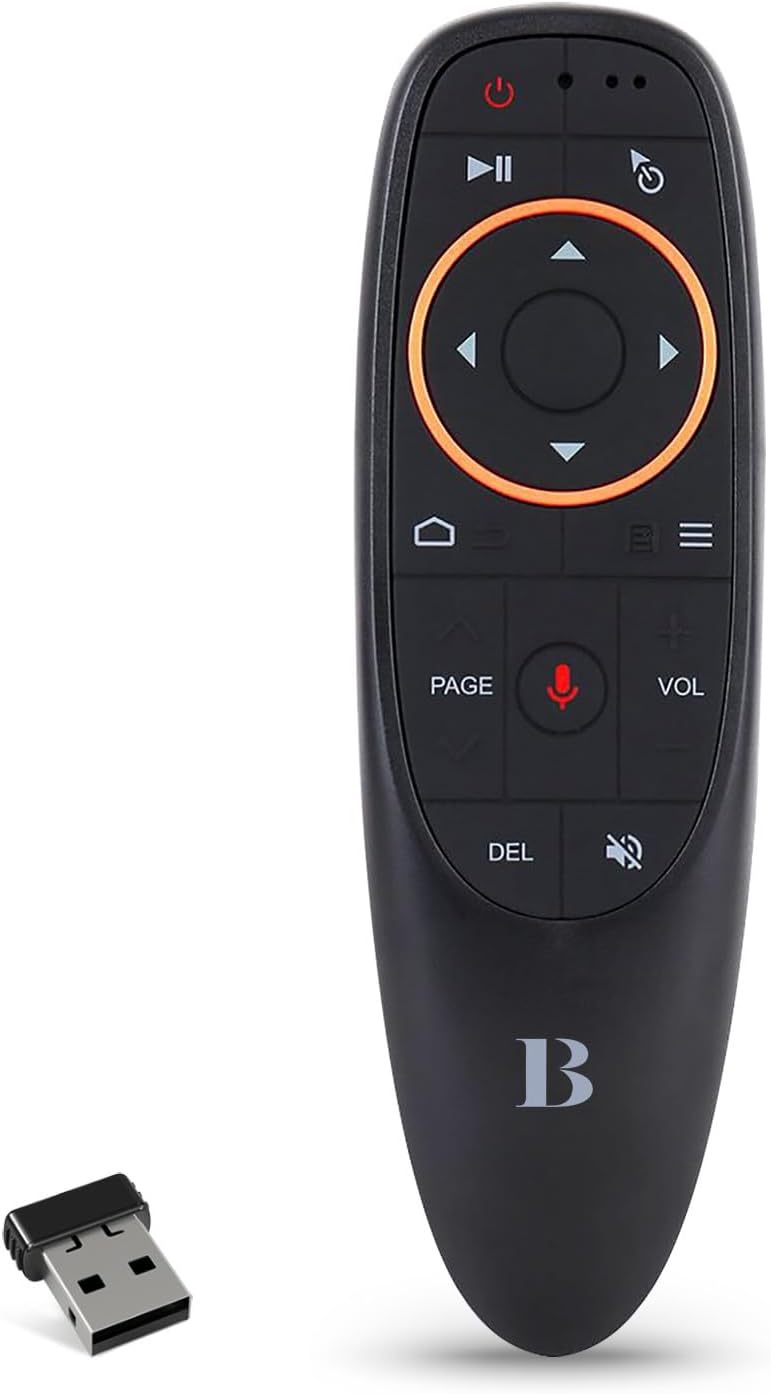
The BLAir Mouse Remote Control is a versatile 2.4G RF wireless remote designed for seamless interaction with your PC, Smart TV, and Android devices. Featuring voice input, a 6-axis gyroscope for precise navigation, and IR learning capabilities, this ergonomic remote offers a user-friendly experience with a maximum range of 33 feet. Compatible with a wide array of devices, it’s the perfect tool for modern entertainment.


| ASIN | B08V5JG7JB |
| Additional Features | Ergonomic |
| Battery Type | Alkaline |
| Best Sellers Rank | #25,399 in Electronics ( See Top 100 in Electronics ) #1,183 in Remote Controls (Electronics) |
| Brand | BL |
| Button Quantity | 17 |
| Color | Black |
| Compatible Devices | Android TV Box, Mac, Personal Computer, Smart TV Box, Television |
| Connectivity Technology | 2.4GHz Wireless USB dongle |
| Controller Type | 2.4GHz USB Wireless Connection |
| Customer Reviews | 3.8 3.8 out of 5 stars (520) |
| Item Weight | 0.06 Kilograms |
| Manufacturer | Amaminibox |
| Maximum Number of Supported Devices | 1 |
| Maximum Range | 33 Feet |
| Mfr Part Number | ZRW0118-SBN |
| Model Name | ZRW0118-SBN |
| Model Number | ZRW0118-SBN |
| Number of Batteries | 2 AAA batteries required. |
| UPC | 726962989633 |
| Unit Count | 1.0 Count |
| Warranty Description | 1 Year Manufucturer |
B**S
Replacement worked with ZERO issues
Forgot the remote at home , when I took my android o/S so needed to find a new one.
A**R
It works right out of the box as soon as batteries are installed and the USB receiver is plugged in
First thing you might want to do is reprogram the power button so as not to accidentally turn off your computer. Aside from that, just love this simple little 17 button USB / IR air mouse. It is intended as backup / replacement for the old Windows Media Center RC-6 remote that is getting long past any expected remaining functional life. All of the functions work immediately with no drivers or setup needed other than plugging in the USB-A WiFi receiver. Everything works great and the gyroscopic mouse function is a welcome upgrade to my previous remote. Documentation of the buttons and IR reprogramming is adequate -- how to change cursor speed is also covered. Recommended.
V**.
Not an exact replacement for the G30 model.
Update to this review: After using for 2 months, the air mouse keeps activating on it's own and the other buttons are acting squirrely as well. Tried new batteries but same issue. Would return it for refund but Amazon said it's now past the return date so I'm buying an OEM Nvidia remote and trashing this one. Smaller than expected, it lacks some button features that the G30 model has, like no way to open Nvidia's recently used apps area. (You can however program the menu button in Nvidia settings for a double click to clear the recent apps). You can only program the power button for an IR function. Which is pretty useless because you'll need that button as an OF/OFF for your streaming box. The volume button should be on the left side of the remote like most others are and what irritates me the most is the silk screening of button labels should be bright white not a dull grey for visibility. I do like the positive, more quiet click feedback when you press the buttons. The G30 model I had before bounced too much and many times gave a double or triple click when pressed once. That's why I ordered this one.
D**Y
Love this remote
Still working
B**R
Good Remote - Need a Bag/Pouch & Laser Pointer
The remote itself works well. The functionality, button control, etc., works well. No laser pointer though. The buttons are not super sensitive--and they are spaced well enough I do not have the 'fat finger' issue (hitting more than one button at a time) I had with the remote I trashed in favor of this one. The reason for the 3 stars is it requires a 'dongle' (little piece that plugs into the computer/device which you want to control) but there is no place on the device to store the dongle. In addition, it did not come with a little 'bag' or 'pouch' to store it in so you don't even have the option to store them together in a pouch. The only option is to take out the batteries and store it in the battery compartment--but then you have to keep up with the batteries. Bottom line, I'm supremely confident that I will lose that little piece and this thing will be worthless pretty soon. )
H**N
Works perfectly
I set up a small pc for my son to play roblox on his tv. I needed an inexpensive "air" mouse that he could use to control the computer from 10 feet away. This device works perfectly. It is plug and play, no programming required. The buttons are simple and functional. Controlling the mouse is really smooth and very easy even for a child with this device. I highly recommend it.
C**N
Great point and click remote for the money
Five stars since it does what it says. I purchased this to control a PC connected to my TV for multimedia. The mouse feature is great. You can point and click. Hold to drag also. Just so you know, if you need to type anything you're out of luck. Better off getting a wireless keyboard mouse pad combo at least for a PC. With devices that have voice recognition or on screen keyboard like a an android PC box it may work out fine.
K**R
Love this remote
I have a few of these "air mice" for my android tv boxes. Perfect size, light weight, easy to use. It takes 2x triple AAA batteries. They don't last as long as I'd like them too. But they last longer when you keep the backlight for the buttons off. I adhesive these little white plastic hooks on the back of the remotes to hang them in my wall, so I don't lose the remotes lol. I also have the air mouse with a keyboard on the back side but to be honest, those are big, bulky, and take just as much time to use than utilizing this air mouse to type whatever it is, using the on screen keyboard.
M**D
Very good Product
S**A
Like the product, good price and works as expected
S**I
منتج رائع وجودة مميزة
I**Y
المنتج لا يعمل
B**R
As a remote it's perfect on size and functionality but the problem comes on the buttons..the buttons are so flat that you need to look with your ayes to see the button that you want to press . Buttons in my opinion should be higher than the remote surface so that you can feel it with your hand and finger to know what you are pressing without looking Update : after using it for some time now I noticed that when using Air mouse feature it doesn't select everything in the browser while other air mouses do .. in short compared to other brands and designs this is the worst of them all. the buttons are too flat with remote surface .. inconvenient while doing exercises..the air mouse doesn't respond to every option in the Web browser
Trustpilot
3 days ago
2 weeks ago